A patrol report full of photos tells a client that someone was on site. It does not tell them which doors were checked. ProRota's new QR checkpoint patrols record every point on the route, what was missed, and why.
Every security contract has a patrol clause. Hourly tours of the perimeter, a check of the plant room at midnight, the loading bay twice a night. And every client eventually asks the same question: how do I know it happened?
For most operations the honest answer is a patrol report with a handful of photos attached. It proves an officer was on site with a phone. It does not prove the officer went to the plant room, and it cannot show the one door that was never checked, because a missing photo looks exactly like a photo nobody thought to take.
That gap is what QR checkpoint patrols close.
What Changes With Checkpoints
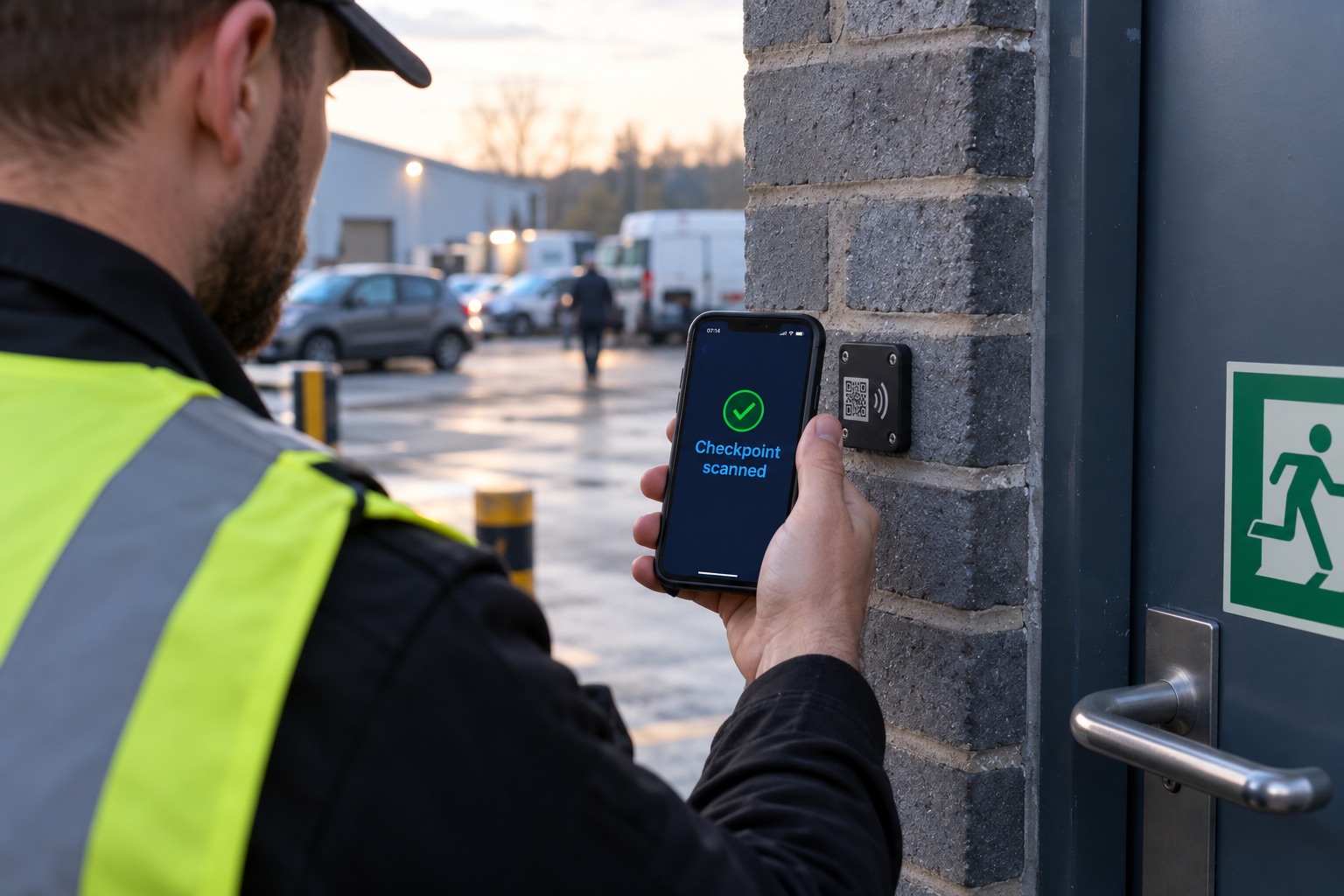
A checkpoint is a fixed point on the route that has to be visited, the main gate, the loading bay, the fire exit on level two. Each one gets a QR tag fixed on site. On a tour, the officer scans each tag as they reach it, and the scan is recorded against that checkpoint with the time and the phone's GPS position.
The tour is no longer a pile of evidence someone has to interpret. It is a list, and every item on it is either done, explained or outstanding.
- 1. Print
One QR tag per checkpoint, printed from the site record and fixed in place.
- 2. Scan
The guard scans each tag in the app. Time and GPS position are recorded against that checkpoint.
- 3. Explain
A checkpoint that cannot be reached is skipped with a reason rather than left blank.
- 4. Settle
The tour closes as Submitted, or Partial if a required checkpoint was not covered.
Setting It Up on a Site
Checkpoints are added in the site record: a name, an optional note to help the officer find it, and whether it is required on every tour. Tags print from the same screen, one per checkpoint, ready to laminate and fix in place.
The tags are deliberately plain. They carry a random code, not a web address and not the name of the site, so a photo of one tells nobody anything. If a tag goes missing or you suspect it has been copied, you void it and print a replacement, and the old one stops working immediately.
The site is then switched from photo patrols to QR patrols. From the next shift onwards, patrols generated for that site are checkpoint tours.
What the Officer Sees
In the employee app, a QR tour opens as the list of checkpoints with a progress count, two of six recorded, one skipped. The officer taps Scan, points the camera at the tag, and the checkpoint turns green.
Real sites do not always cooperate, so two situations are designed for rather than treated as failures.
A checkpoint that cannot be reached, a locked plant room, a flooded stairwell, a contractor's vehicle across the route, is skipped with a short reason. The report then says "skipped, door locked" against that checkpoint instead of leaving an unexplained gap.
Basements, stairwells and car parks lose signal. Scans taken without signal are saved on the phone and upload automatically once it reconnects, keeping the time they were actually scanned. The officer carries on walking.
When the officer completes the tour, it settles on its own. Every required checkpoint covered and it is Submitted. Anything outstanding and it is marked Partial, which is a very different thing to report to a client from a patrol that was simply never started.
Flagged Not Blocked
Any honest description of QR patrols has to admit the obvious weakness. A determined officer can photograph every tag on their first night and scan the photos from the car park.
There are two ways to respond to that. One is to refuse scans that look wrong. The problem is that the same rules also refuse honest scans, a weak GPS fix indoors, a checkpoint placed a little far from where it was mapped, and every refused scan is evidence of a real patrol thrown away.
ProRota takes the other route. Every scan is recorded, and scans that do not add up are flagged for review.
Every scan is kept. The odd ones are marked.
A scan is never refused because something looks wrong. It is recorded with a flag, and the tour shows "needs review", so the manager decides with the evidence in front of them instead of losing an honest patrol to a strict rule.
A flagged tour is marked as needing review in the shift details, with the reason next to the exact checkpoint that raised it. The decision stays with a manager who can see the whole picture, which is where it belongs.
What Managers and Clients See
In the shift details, each patrol now shows its status, Submitted, Partial, In Progress or Missed, and how many checkpoints were covered. Opening one gives the checkpoint-by-checkpoint breakdown: the time of each scan, the result, any skip reason and any flag.
The patrol report PDF carries the same breakdown, laid out alongside the rest of the shift record, so the document you send a client answers their question directly. Not "an officer patrolled", but these six points, at these times, and here is why the seventh was not checked.
Photo Patrols Are Not Going Anywhere
QR tags are not the right answer for every site. A small office with two officers and no contracted route gains little from printing and fixing tags, and a photo patrol is quicker to run.
So the choice is made per site. Sites stay on photo patrols unless you switch them, and a company can run both, QR checkpoints on the distribution centre where the client wants a verifiable route, photos on the reception desk contract where they do not.
| Photo patrol | QR checkpoint patrol | |
|---|---|---|
| What proves the visit | Photos taken during the patrol | A scan of the tag fixed at each checkpoint |
| Which areas were covered | Inferred from the photos | Listed checkpoint by checkpoint |
| A missed area | Hard to spot | Shown as not reached, or skipped with a reason |
| Setup on site | None | Print and fix one tag per checkpoint |
| Best for | Small sites, ad hoc checks | Contracted routes a client wants evidenced |
Where to Start
The sites worth converting first are the ones where a client has already asked for proof: contracts with a defined patrol route, sites that have had an incident, and anywhere a missed check would be expensive to explain afterwards.
Start with a short route, five or six checkpoints, and review the first week of tours together with the officers who walk it. The tag positions almost always need adjusting once people are walking the route for real, and the skip reasons tell you which ones.
QR checkpoint patrols are available now for ProRota customers using site patrols, alongside the existing photo patrols. Guards need the latest version of the ProRota app from the App Store or Google Play. If you would like to see it on one of your own sites, get in touch and we will set up a route with you.